Building This Portfolio: Vike, an In-Build SQLite, and Two Content Engines
How this portfolio runs a fully searchable, bilingual, content-rich site with no backend — just a SQLite database generated at build time and shipped inside the bundle. A feature-by-feature tour, plus the two open-source content engines (HyperDown + HyperJson) you can reuse to build the same thing.
by Zau JulioJune 12, 202616 min read
Building This Portfolio
No backend. No database service. No CMS bill. This site runs a fully searchable,
bilingual, content-rich experience from a SQLite file generated at build time and shipped
inside the bundle — and the two engines that make it work are open source, so you can build
the same way.
Most developer portfolios are one of two things: a static site with hardcoded
content, or a heavyweight CMS-backed app with a database, an API, and a hosting
bill to match. This one is neither. It is a hybrid SSG + SSR application that
serves a fully searchable, bilingual, content-rich site — and the only "database"
it has is a SQLite file generated at build time and shipped inside the bundle.
There is no backend service to run, nothing to keep awake, and nothing to pay for
beyond static-ish hosting.
This post is the first in a three-part series. It is the overview — a
feature-by-feature walk through the whole site and the decisions behind it. The
next two posts drill into the two content engines I built to make it work:
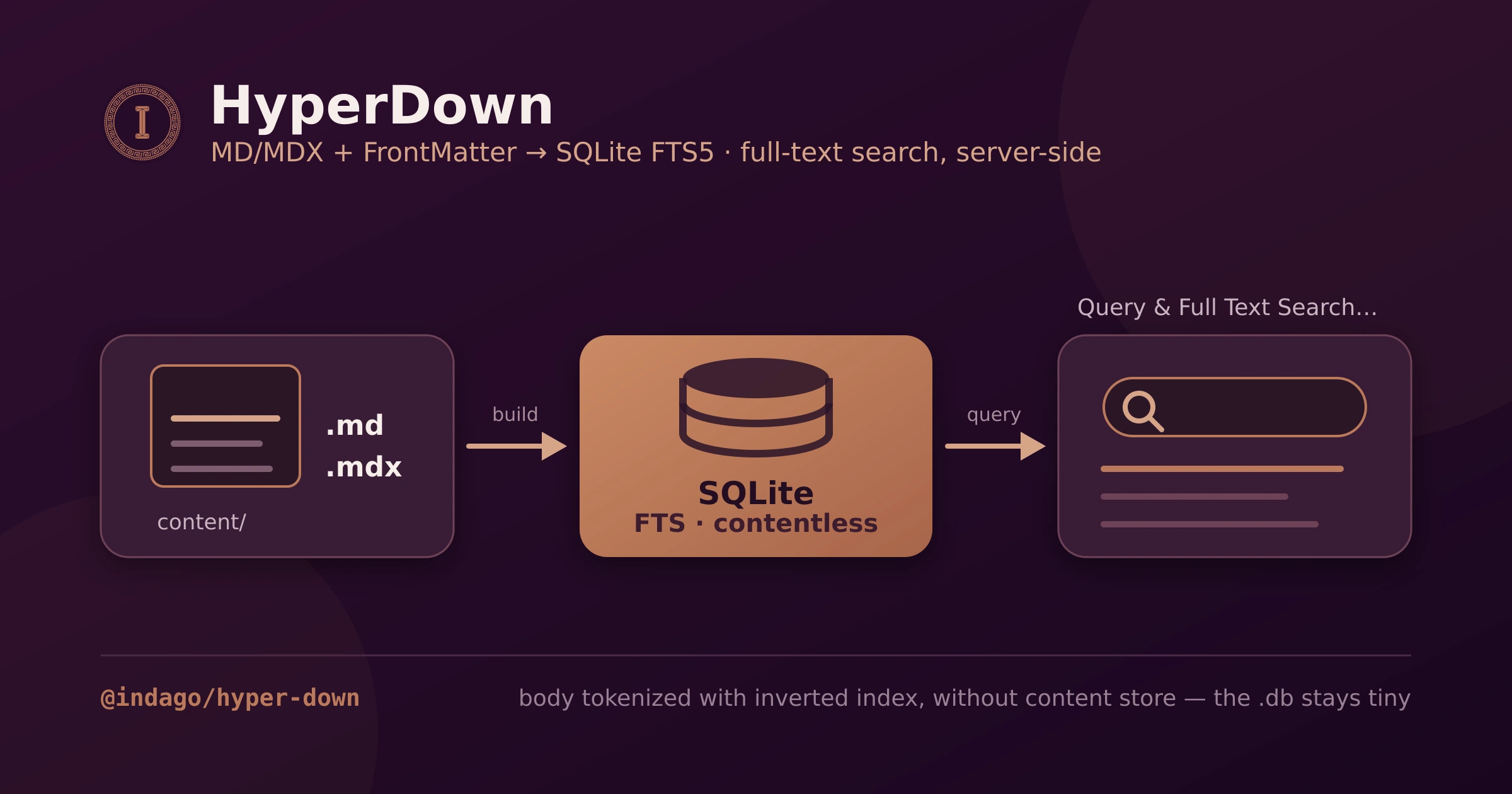
HyperDown (Markdown/MDX → SQLite) and
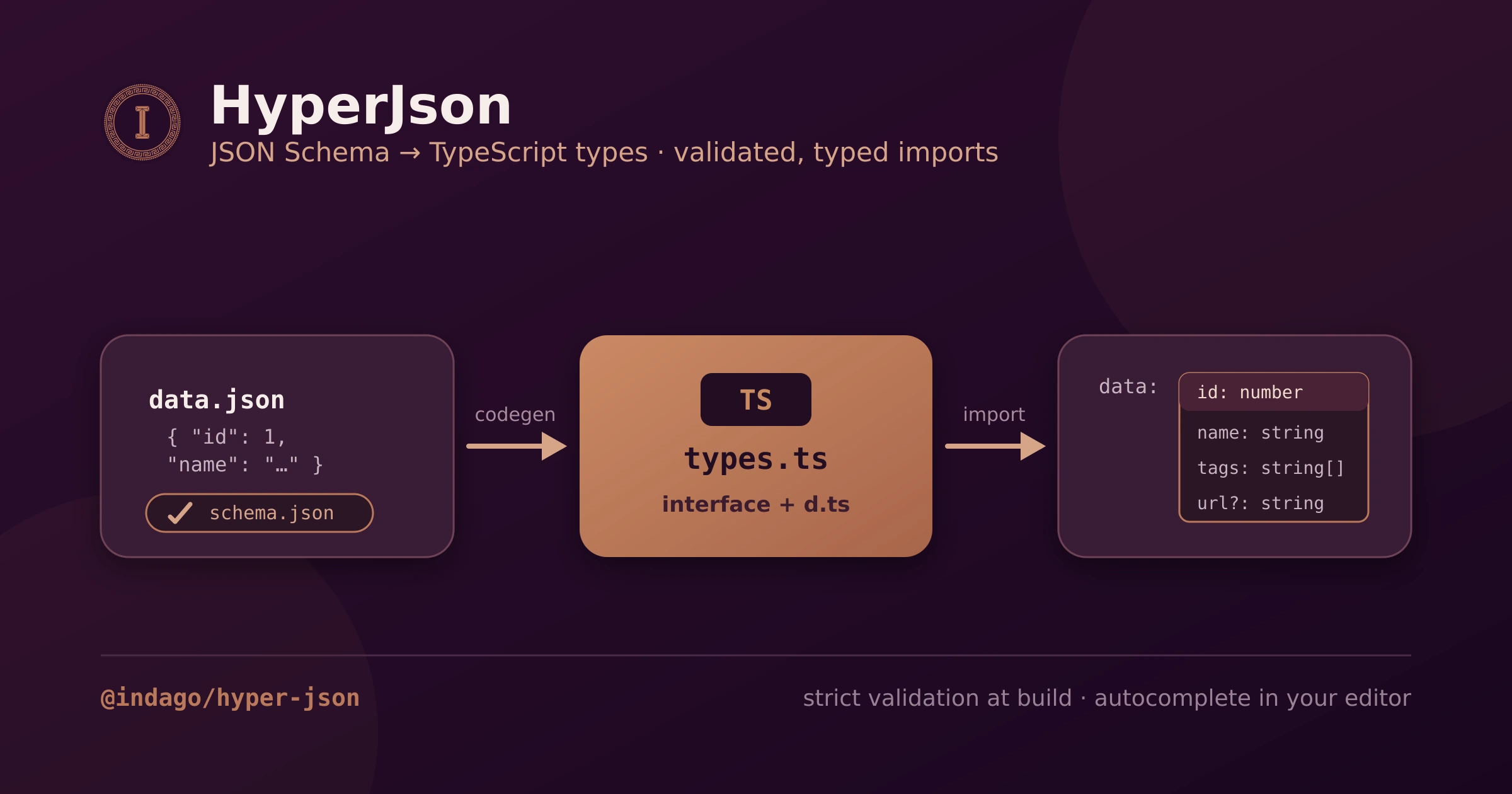
HyperJson (JSON Schema → typed content).
- Building This Portfolio
- The big idea: a database that ships in the build
- The stack at a glance
- Routing and bilingual i18n
- Two content engines, one content folder
- Structured content with HyperJson
- Prose and recipes with HyperDown
- The Articles experience
- Reading aids: TOC minimap and hash scroll
- Series navigation and suggested content
- Cooking, Photography, Music, and Links
- The MDX rendering pipeline
- SEO, Open Graph, and the sitemap
- Prerender strategy: what is static, what is live
- Deploy: Vercel and Docker
- Quality gates
- What I would tell you to steal
The big idea: a database that ships in the build
The central trick is this: content lives as plain files in the repo —
Markdown/MDX for prose, JSON for structured data — and the build compiles those
files into a SQLite database and a set of typed modules. At runtime, server
loaders query that SQLite file directly with
bun:sqlite (or node:sqlite on
Node 22+, which is what Vercel runs). Nothing is fetched from an external service.Why bother with SQLite at all, instead of just importing JSON? Because the
articles and recipes need full-text search, faceted filtering, sorting, and
pagination — and doing that over an in-memory array does not scale or stay fast.
SQLite's FTS5 gives me a real inverted index for free, and because the index
is contentless, the database stays small: it stores the searchable tokens and
the frontmatter metadata, but never the article body. The body is loaded
separately, at render time, from a Vite-generated module map.
The result is a site that feels like it has a backend — live search that responds
to every keystroke server-side — with the operational profile of a static site.
The stack at a glance
| Layer | Choice |
|---|---|
| Framework | Vike (vike + vike-react + vike-server) — hybrid SSG/SSR |
| UI | React 19 |
| Server | Hono via @vikejs/hono |
| Runtime | Bun in dev/Docker; Node 22 on Vercel |
| Styling | Tailwind CSS v4 + shadcn-style components + lucide icons |
| Prose content | @indago/hyper-down — MDX → SQLite FTS5 (SSR-only) |
| Structured data | @indago/hyper-json — JSON Schema → typed imports |
| i18n | i18next + react-i18next, locale-stripping routing |
| Lint / format | OXC (oxlint + oxfmt) — not ESLint, not Biome |
| Tests | Vitest (unit + content-integrity) and Playwright (e2e) |
| Deploy | Vercel (Build Output API) or Docker (self-hosted SSR) |
Two things on that list are mine: the content engines. Everything else is
off-the-shelf, wired together deliberately.
Routing and bilingual i18n
The site is fully bilingual — English and Brazilian Portuguese — and the i18n
strategy is locale-stripping. The default locale (
en) is prefix-free, so the
homepage is /, the articles live at /articles, and so on. Portuguese lives
under /pt: /pt/articles, /pt/cooking, etc.A Vike
+onBeforeRoute hook strips the /pt prefix before routing, sets
pageContext.locale, and computes a urlLogical that the rest of the app routes
against. The subtle part — and the source of a bug I only caught with an e2e test —
is that urlLogical must keep the query string and hash. Vike re-parses the
URL from that logical value, so a pathname-only version silently empties every
search-driven loader. The fix is to build it as
pathnameWithoutLocale + search + hash.// +onBeforeRoute.ts (essence)
const { urlWithoutLocale, locale } = extractLocale(pageContext.urlParsed);
return {
pageContext: {
locale,
// search + hash are load-bearing — without them, ?q=… disappears
urlLogical: urlWithoutLocale + searchOriginal + hashOriginal,
},
};
There is a matching detail on the client: the search-params navigation helper has
to build its target from
window.location.pathname (which is locale-prefixed),
not from the locale-stripped pageContext.urlPathname — otherwise a /pt visitor
gets bounced back to the English version on the first filter click.Two content engines, one content folder
All content lives under
content/, split by type, then by locale:content/
├── article/ HyperDown (MDX)
│ ├── en/*.mdx
│ └── pt-BR/*.mdx
├── recipe/ HyperDown (MDX)
│ ├── en/*.mdx
│ └── pt-BR/*.mdx
├── projects/ HyperJson (JSON + schema)
│ ├── schema.json
│ └── en/projects.json
├── profile/ skills/ education/ languages/
├── music/ photography/
Two engines split the work cleanly. HyperJson owns structured data — anything
that is a list of records with a fixed shape (projects, skills, playlists, photo
albums). HyperDown owns prose — anything with a body you want to read and
search (articles, recipes). They share no code and have no dependency on each
other; the only thing they share is the
content/ directory and the convention of
locale subfolders.I wrote both as standalone, published npm packages so the portfolio consumes them
like any other dependency. The two follow-up posts are the deep dives, so here I
will only show how the site uses them.
Structured content with HyperJson
A HyperJson content type is a folder with a
schema.json (a JSON Schema) and
per-locale data files. At build time, every data file is validated against its
schema with Ajv in strict mode — an unknown key or a wrong type fails the
build — and TypeScript types are generated from the schema so every import is
fully typed:// Fully typed — the type is generated from projects/schema.json
import projects from "@content/projects/en/projects.json";
That single guarantee — invalid content cannot ship, and valid content arrives
typed — is what powers the entire static half of the site: the About section, the
Projects and Skills grids, the Education and Languages blocks, the Music
playlists, and the Photography albums all read straight from typed JSON.
On top of the typed imports, HyperJson ships headless hooks for shaping data in
React —
useFilter, useSearch, useSort, usePaginate, and a useComposed
that chains all four. The Music page uses them to filter playlists by genre and
search by title/artist entirely on the client, with zero UI imposed:const { paginated } = useComposed(playlists, {
filters: [{ key: "genre", value: selectedGenre }],
searchQuery,
searchFields: ["title", "artist"],
sort: { key: "title", dir: "asc" },
page,
perPage: 12,
});
Prose and recipes with HyperDown
HyperDown takes the opposite path: it compiles every Markdown/MDX file into a
SQLite database with a contentless FTS5 index. The frontmatter becomes queryable
columns; the body is tokenized into the search index but stored separately and
loaded lazily at render time.
Content types are declared once in
frontmatter.json (the FrontMatter CMS format,
so the site is editable from VS Code's FrontMatter panel). That single file is the
source of truth for both the SQLite schema and the generated TypeScript types. The
article type, for example, declares title, description, date, tags,
categories, cover, readingTime — and, as of this series, two new optional
fields, prev and next, which I will come back to.Each content type gets a generated, server-only repository with a typed API:
// articles/+data.ts — runs only on the server (SSR/SSG)
const { results, totalCount, totalPages } = await articleRepository.search({
  locale,
  searchQuery, // FTS5 across all locales
  filters: activeTag ? { tag: activeTag } : {},
  sort: { sortBy: "date", sortDir: "desc" },
  pagination: { page, pageSize: 9 },
});
The Articles experience
The articles list is the showcase of the whole architecture, because it is live
server-side search. The listing page sets
prerender: false, so under the Hono
server every URL change re-runs the loader on the server and returns a freshly
queried page. The entire state lives in the URL — q, tag, page, sort,
dir — which means every result set is shareable and bookmarkable, and the back
button just works.Features on the listing:
- Full-text search over titles, descriptions, and article bodies, with prefix
matching (typing
hypermatchesHyperDown). The query is debounced on the client and pushed into the URL; the server does the actual FTS. - Tag facets built from the real distribution of tags in the database
(
distinctValues, ordered by frequency), with a "show more" affordance. - Sorting by date or title, ascending or descending.
- Pagination with an accurate total count computed in the same query.
The detail page (
/articles/@slug) is the opposite — fully prerendered to
static HTML. Every slug is enumerated at build time and rendered, including its
/pt twin. It shows the cover, the meta bar (author, date, reading time, a
canonical link if the piece was published elsewhere), the rendered MDX body, and
the tag chips that link back into the filtered list.Reading aids: TOC minimap and hash scroll
Long technical posts need navigation, so the detail page has two reading aids that
took more care than they look.
The PageMinimap renders a clickable, scaled-down mirror of the article on the
side — a table-of-contents you can see the shape of. The catch: it is a literal
clone of the article DOM, so it would duplicate every heading
id. Hash
navigation would then jump to the mirror copy. The fix is to strip every
descendant id from the clone, leaving the ids unique to the real article.The hash scroll behavior handles
#section links in the TOC. Vike intercepts
<a href="#…"> clicks via pushState, so a normal handler never sees them. The
workaround is a capture-phase click listener that catches TOC clicks before
Vike does and scrolls smoothly to the target.Both behaviors are covered by Playwright specs, precisely because they are the kind
of thing that breaks silently on a framework upgrade.
Series navigation and suggested content
This is the newest feature, and the reason this article exists as part of a
series.
Series navigation turns related articles into an explicit, ordered reading
path — a doubly-linked list expressed entirely in frontmatter. Each article can
declare an optional
prev and next slug:# building-this-portfolio.mdx
next: "what-is-hyperdown"
# what-is-hyperdown.mdx
prev: "building-this-portfolio"
next: "what-is-hyperjson"
# what-is-hyperjson.mdx
prev: "what-is-hyperdown"
The detail loader resolves those slugs to their metadata and renders a previous/
next pager at the foot of the article. It is entirely opt-in: an article with no
prev/next (like my SOM deep dive) simply shows no pager.Suggested content is the automatic counterpart. At the bottom of every article
and recipe, the site shows up to three related items — and the ranking is done by
tag order. The current item's tags are treated as a priority list: candidates
sharing the first tag fill the slots first, then the second tag complements up to
three, then the third, and so on. I added this as a first-class
related() method
to HyperDown so it runs as a single indexed SQL query against the tags bridge,
ranked with a MIN(CASE …) over the matched tag positions:const suggestions = await articleRepository.related({
slug,
tags: article.tags, // priority order
locale,
limit: 3,
});
On desktop the three suggestions sit side by side; on mobile they stack into three
rows. Because the ranking keys off the article you are reading, the suggestions
stay genuinely relevant instead of being a generic "latest posts" strip.
Cooking, Photography, Music, and Links
The same machinery powers the rest of the site, which is the point — once the
engines exist, every section is cheap.
- Cooking mirrors Articles but for recipes: the listing has facets for cuisine, meal type, and course type (each a real column in SQLite), plus search and pagination. Recipe detail pages render the MDX method and ingredient lists, and they get the same tag-ranked suggested-content strip at the bottom.
- Photography reads albums from typed JSON (HyperJson) and lays them out as a
gallery; images live in
public/photos. - Music is the best showcase of the headless hooks — playlists and favorites
from JSON, filtered by genre and searched live on the client with
useComposed. - Links is a compact linktree-style page for social and contact links, also driven by content rather than hardcoded markup.
The MDX rendering pipeline
Article and recipe bodies are real MDX, so they can contain JSX, and the render
pipeline is tuned for technical writing. The
MdxRender component (from HyperDown)
renders the lazily-loaded body with a Suspense fallback, and the plugin chain adds:rehype-highlight(highlight.js) for syntax-highlighted code blocks — loaded only on pages that actually render MDX, to keep it off every other page's critical path.rehype-katex+remark-mathfor LaTeX math, so I can writeargmin/Σ/integrals in the SOM post.remark-gfmfor tables, task lists, and strikethrough.- mermaid for inline diagrams (flowcharts and the like) rendered from fenced code blocks.
The CSS for code and math (
github-dark and katex.min.css) is imported at the
detail-page level rather than globally, so the homepage never pays for it.SEO, Open Graph, and the sitemap
Because the detail pages are prerendered, they are fully crawlable static HTML with
real metadata. Each article emits its own Open Graph and Twitter card tags —
og:title, og:description, og:image (the cover), article:published_time, and
one article:tag per tag — on top of the locale-aware canonical and hreflang
links from the root head.The sitemap is generated at build time by HyperDown's sitemap plugin from a
declarative block in
hyperdown.config.json: static routes with their priorities,
plus one entry per content item across both locales. It writes straight to
public/sitemap.xml, so search engines get an accurate map every build without me
maintaining it by hand.Prerender strategy: what is static, what is live
The hybrid SSG/SSR split is deliberate and per-route:
| Route | Mode | Why |
|---|---|---|
/, sections | Prerendered (SSG) | Content is static; ship pure HTML. |
/articles, /cooking listings | Live SSR (prerender: false) | Search/filter must run per request. |
/articles/@slug, /cooking/@slug | Prerendered (SSG) | Every slug is known at build; render once. |
Globally the app runs with
prerender: { partial: true }, so most of the site is
static HTML, while the two listing routes opt back into SSR. Keeping the listings
as SSR is also what keeps a real server bundle in the output, which the Hono
adapter then serves.Deploy: Vercel and Docker
The same build targets two very different homes.
On Vercel, a plugin (
vite-plugin-vercel, enabled only when Vercel sets
VERCEL=1) rewrites the build into the Build Output API layout under
.vercel/output/. The SSR functions run on Node 22, which is exactly why the
SQLite client is written to fall back from bun:sqlite to node:sqlite — same
code, two runtimes. The generated .db files are copied into the function bundle
so the loaders can read them at the edge of the request.For self-hosting, a plain build produces a runnable Hono SSR server, and the
included
Dockerfile / docker-compose.yml package it so bun run start serves
the whole thing from one container. No external database, because the database is
already inside the image.Quality gates
Nothing ships without passing four gates, in order:
oxlint+oxfmt— the project is on OXC, not ESLint or Biome. Fast enough to run on every save.tsc --noEmit— strict TypeScript across the app, including the generated content types, so a schema change that breaks a consumer fails here.- Vitest — unit tests plus a content-integrity suite that parses every content file and asserts the collections are non-empty and well-typed.
- Playwright e2e — the behaviors that break silently: locale-aware search, hash-scroll, scroll-position preservation, the minimap id-stripping.
The content-integrity and e2e tests are the ones that earn their keep: they catch
the failure modes that types alone cannot, like a search loader that returns
nothing because a URL was parsed without its query string.
What I would tell you to steal
If you take one idea from this: you probably do not need a backend for a
content site. Compile your content into an indexed artifact at build time, query
it from server loaders, and you get real search and filtering with none of the
operational weight.
And you do not have to rebuild any of it from scratch. The two engines that make this
ergonomic are published, documented, and scaffolded — one command gives you this exact
architecture (Vike, React Router v7, TanStack Start, or Next.js), already wired and tested:
bun create @indago/app
The deep dives on each engine — turning a folder of MDX into a typed, searchable SQLite
database, and a folder of JSON into validated typed imports — are the next two posts.
Next up: HyperDown, the engine that turns this folder of Markdown into a
full-text-searchable SQLite database that ships in the build.
This portfolio is open source, and so are its engines. HyperDown and HyperJson are on npm as@indago/hyper-downand@indago/hyper-json(source on GitHub). If any of this is useful to you, take it — and tell me what you build.